
Modding allows players to customize their favorite games, improve visuals, add new mechanics, fix bugs, or even create entirely new story experiences. For beginners, however, the process can feel intimidating. A single incorrect installation can cause crashes, broken saves, or security risks. The good news is that safe modding is easy once you understand the correct workflow.
Understanding What Mods Actually Change Inside a Game
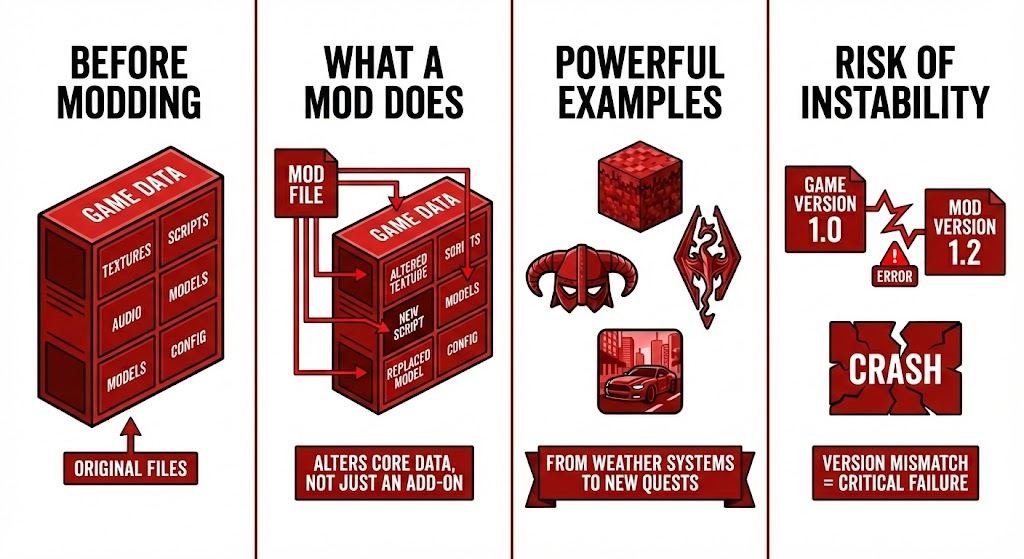
A mod is not just an extra file you drop into a folder. Most mods alter core game data such as textures, scripts, audio files, models, or configuration settings. Some small mods replace a single texture, while larger ones rewrite entire gameplay systems.
Games with huge modding ecosystems like Minecraft, The Elder Scrolls V: Skyrim, and Grand Theft Auto V demonstrate how powerful modifications can be. Players have created everything from realistic weather systems to completely new quests with voice acting.
Because mods directly interact with the game’s internal structure, even a minor mismatch in file versions can cause instability. This is why installing safely is less about luck and more about following a structured process.
Why Beginners Run Into Problems When Installing Mods
Most modding issues happen not because mods are unsafe, but because users rush through installation without checking compatibility or instructions. A common beginner mistake is downloading multiple mods at once and installing them together. When the game crashes, it becomes impossible to identify which mod caused the issue.
Another frequent problem is the misunderstanding that games update regularly. When a game receives an update, older mods may no longer function properly because they were designed for a previous version. Beginners often assume the mod is broken permanently, when in reality it simply needs an updated release.
Security risks also come into play. While most modding communities are legitimate, downloading files from unknown websites increases the chance of malware hidden inside installers. Safe modding is therefore both a technical and a security practice.
Choosing the Safest Place to Download Mods
Where you download mods matters more than anything else. Trusted hosting platforms exist specifically to organize and verify community uploads. One of the most widely used mod hosting platforms is Nexus Mods, which provides user reviews, version tracking, update notifications, and moderation systems that remove suspicious files.
When evaluating a mod page, do not focus only on the download button. Instead, look for signs of reliability such as:
- Detailed screenshots showing the mod in action
- Clear installation instructions written by the creator
- Active user comments confirming the mod works
- Update history showing the author maintains the project
A well-documented mod page usually indicates a safer, more stable file.
How Official Mod Platforms Make Installation Much Safer
Some modern games simplify modding by integrating official systems. The Steam Workshop is one of the safest environments for beginners because it automates the entire installation process. Instead of manually moving files, you subscribe to a mod and the platform installs it into the correct directory.
Automatic systems reduce the risk of:
- Incorrect folder placement
- Missing dependency files
- Load order errors
- Version mismatches
If your game supports workshop integration, always start there before attempting manual downloads.
Preparing Your Game Before Installing Any Mods
Safe installation begins before you even download your first mod. Preparation dramatically reduces the risk of irreversible problems.
First, ensure your base game launches normally with no errors. Installing mods on an already unstable game multiplies problems. Next, locate your save file directory and create a manual backup copy. Saving corruption is rare but possible, especially with large gameplay modifications.
If your storage space allows it, keeping a clean copy of the original game folder is extremely helpful. This allows instant restoration without reinstalling the entire game, saving hours of download time.
This preparation stage may feel unnecessary to beginners, but experienced mod users consider it essential.
Why Mod Managers Are Essential for Beginners
Manual installation works, but beginners benefit greatly from using mod managers. A mod manager is software that automatically organizes installed mods, tracks file changes, and allows one-click disabling or removal.
Without a manager, uninstalling a mod often requires remembering exactly which files were replaced. With a manager, the system handles file tracking for you.
More importantly, mod managers help control something called load order. Load order determines which mod loads first when multiple mods change similar game data. An incorrect load order can cause missing textures, invisible characters, or crashes. Managers automatically suggest stable arrangements, preventing these issues.
For anyone planning to use more than a few mods, a manager quickly becomes indispensable.
Understanding Dependencies and Why Mods Sometimes Need Extra Files
Many beginners encounter the term dependency and feel confused. A dependency means a mod requires another component to function. Think of it like installing an app that requires a specific system library first.
Large gameplay mods often rely on scripting frameworks, shared texture libraries, or community-created modding engines. If these are missing, the mod may fail silently or crash the game during startup.
Always check the requirements section carefully before installation. Skipping this step is one of the most common causes of beginner frustration.
Testing Mods the Correct Way After Installation
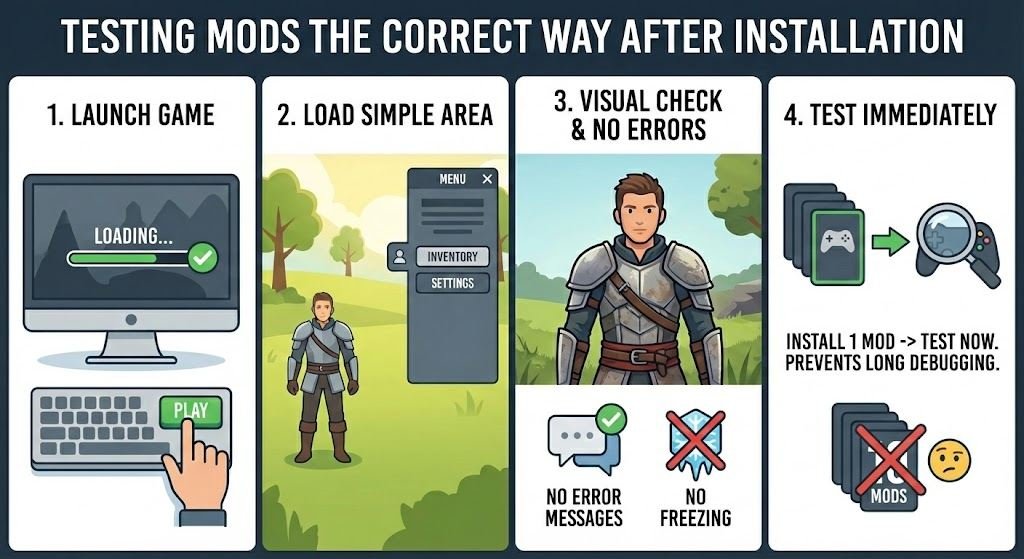
After installing a mod, never assume everything works perfectly. Always perform a short test session. Launch the game, load into a simple area, and confirm that:
- The game starts normally
- Menus open without freezing
- Visual elements display correctly
- No error messages appear
Testing immediately after each installation prevents long debugging sessions later. If you install ten mods and test only afterward, identifying the faulty one becomes far harder.
Experienced modders treat testing as part of the installation process rather than an optional step.
Keeping Your Modded Game Stable Over Time
Safe modding does not end after installation. Maintaining stability requires ongoing attention, especially when your game updates automatically.
Whenever a game receives an update, check whether your mods are confirmed compatible. If the mod creator has not yet released an updated version, temporarily disabling the mod prevents crashes.
It is also wise to avoid removing large gameplay mods in the middle of an active save file. Some mods permanently embed data into saves, and removing them abruptly may break quest progress or world elements. When testing large overhaul mods, starting a new save file is often the safest approach.
Recognizing Warning Signs of Unsafe Mods
Most safe mods behave predictably. If a download asks you to disable antivirus protection, run an unknown installer, or execute background software unrelated to the game, treat this as a serious warning sign.
Legitimate mods usually come as simple archive files containing folders or data files. They rarely require external programs unless those programs are widely known modding tools. Trust your instincts. If installation instructions feel unnecessarily complicated or suspicious, choosing another mod is safer than risking your system.
Building Good Modding Habits From the Start
The difference between beginners who struggle with modding and those who enjoy it smoothly often comes down to habits rather than technical knowledge.
Safe modding habits include installing slowly, reading instructions fully, maintaining backups, testing regularly, and sticking to trusted communities. Once these habits become routine, modding stops feeling risky and becomes an enjoyable part of gaming itself.
Many experienced players eventually run heavily modded games with dozens or even hundreds of modifications running simultaneously. They achieve this not through advanced technical skills, but by consistently following the same safe installation workflow.
Final Advice for First-Time Mod Users
If this is your first time installing mods, start small. Choose one simple visual or quality of life mod for a game you already understand well. Install it carefully, test it, and learn how the process works before expanding into larger modifications.
Modding is one of the most rewarding ways to extend the lifespan of a game. With the right safety approach, you can unlock new content, improve performance, and personalize your gameplay without risking your saves or your system.