

Building a game that runs smoothly on low-end devices is not just a technical decision. It is a smart business strategy. Millions of players around the world use entry-level Android phones, older iPhones, budget laptops, and integrated-graphics PCs. If your game struggles on these systems, you risk losing a massive audience.
Games like Garena Free Fire and PUBG Mobile became global hits largely because they were optimised to run on modest hardware. This complete developer guide explains how to optimise games for low-end devices using practical, real-world techniques that actually work.
Why Optimising for Low-End Devices Is Critical
Low-end optimisation increases:
- Player reach in emerging markets
- Retention rates on older hardware
- Store ratings and reviews
- Battery efficiency on mobile
- Overall polish across all platforms
A well-optimised game does not just help weaker devices. It runs better everywhere. High-end players benefit from smoother frame rates and faster load times, too.
Understanding Low-End Hardware Limitations
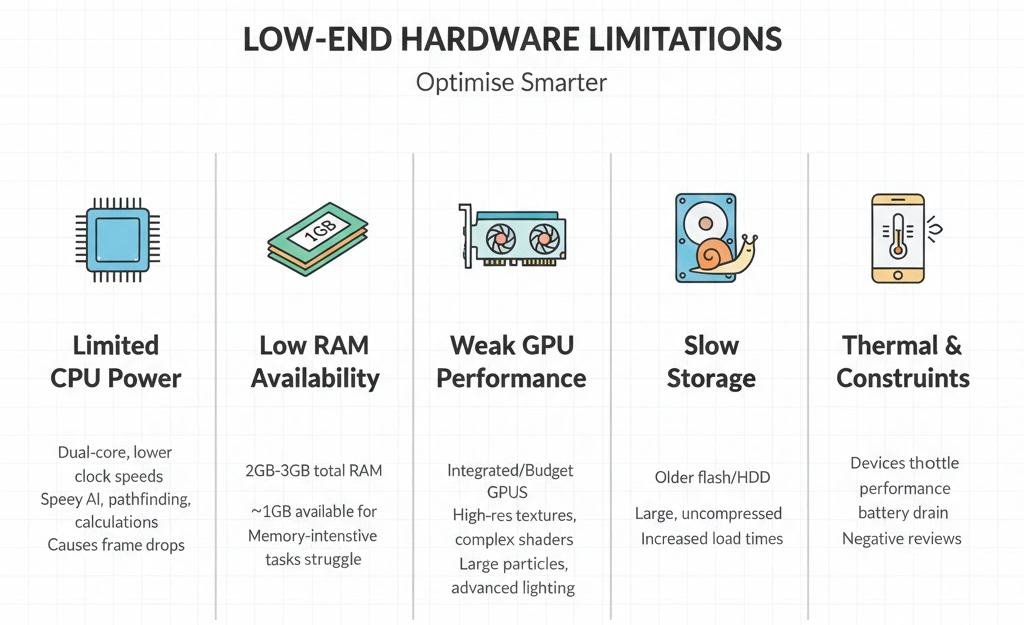
Before optimising, understand the constraints you are working against.
Limited CPU Power
Low-end devices often use dual-core processors with lower clock speeds. Heavy AI logic, real-time pathfinding, and constant calculations can easily cause frame drops.
Low RAM Availability
Many entry-level Android devices still use 2GB to 3GB of RAM. After the operating system takes its share, your game may only have 1GB available.
Weak GPU Performance
Integrated GPUs and budget mobile GPUs struggle with:
- High-resolution textures
- Complex shaders
- Large particle systems
- Advanced lighting models
Slow Storage
Older devices use slower flash memory or hard drives. Large uncompressed assets dramatically increase load times.
Thermal and Battery Constraints
Mobile devices throttle performance when they overheat. Poor optimisation leads to overheating, battery drain, and negative reviews.
Understanding these constraints helps you make smarter optimisation decisions.
Core Graphics Optimisation Techniques
Graphics are usually the biggest performance bottleneck. Start here.
Reduce Draw Calls
Each draw call requires the CPU to communicate with the GPU. Too many draw calls overwhelm weak processors.
Best practices:
- Use static batching for non-moving objects
- Use dynamic batching for small moving objects
- Enable GPU instancing for repeated meshes
- Combine meshes where possible
On low-end mobile devices, aim for fewer than 200 draw calls per frame.
Implement Level of Detail Systems
Level of Detail systems replace complex meshes with simpler versions at a distance.
Example:
- Near camera model uses 5000 polygons
- The mid-distance model uses 1500 polygons
- The far distance model uses 300 polygons
The visual difference is minimal, but GPU savings are significant.
Optimise Texture Usage
Textures consume significant memory and bandwidth.
Key strategies:
- Reduce resolution wherever possible
- Use platform-specific compression formats
- Combine small textures into atlases
- Avoid unnecessary 4K textures on mobile
Most players on small screens will not notice the difference between 2048- and 1024-pixel-resolution textures.
Simplify Shaders
Avoid heavy shader effects on low-end devices.
Disable or reduce:
- Real-time shadows
- Screen space reflections
- Ambient occlusion
- Bloom and motion blur
Use baked lighting instead of real-time lighting whenever possible.
Minimize Overdraw
Overdraw occurs when multiple transparent layers overlap. UI elements, particle effects, and transparent materials are common causes.
Reduce the number of transparent layers and avoid full-screen effects unless necessary.
CPU and Game Logic Optimisation
Optimising CPU usage is essential for stable frame rates.
Optimise Update Loops
Not every object needs to update every frame.
Improve performance by:
- Updating AI less frequently
- Using event-driven logic instead of constant polling
- Disabling scripts on inactive objects
Spreading heavy calculations across multiple frames reduces CPU spikes.
Use Object Pooling
Constantly creating and destroying objects causes memory allocation spikes and garbage collection.
Instead:
- Pre-create objects such as bullets and enemies
- Activate and deactivate them as needed
Object pooling dramatically reduces frame stutter.
Simplify Physics
Physics calculations are expensive.
For low-end optimisation:
- Reduce physics update frequency
- Use primitive colliders like boxes and capsules
- Avoid mesh colliders when possible
- Disable physics for off-screen objects
Every active rigid body consumes CPU time.
Profile Before Optimising
Never guess performance issues.
Use engine profiling tools to identify:
- CPU bottlenecks
- GPU spikes
- Memory allocation issues
Optimise the largest bottleneck first. Small improvements in minor systems rarely matter.
Memory Management Strategies
Low memory devices will close your app if usage exceeds safe limits.
Set Memory Budgets Early
Define strict budgets for:
- Textures
- Audio
- Meshes
- Animation data
- Runtime objects
Stick to those budgets throughout development.
Stream Assets Dynamically
Do not load everything at startup.
Instead:
- Load only current level assets
- Unload unused scenes
- Use asset bundles or addressable systems
Streaming reduces peak memory usage and improves stability.
Compress Audio Files
Audio can silently consume large amounts of memory.
Best practices:
- Use compressed formats
- Lower bitrates for background music
- Convert stereo sound effects to mono
Small changes in audio compression can save tens of megabytes.
Prevent Memory Leaks
Common causes:
- Unreleased references
- Persistent event listeners
- Assets not unloaded properly
Regular memory profiling ensures your game stays within safe limits.
Scalable Graphics Settings System
One quality setting is never enough.
Create Quality Tiers
Define at least three tiers:
Low Quality
- Reduced texture resolution
- No post-processing
- Lower draw distance
- Minimal particle effects
Medium Quality
- Balanced settings
- Moderate shadows
- Basic post-processing
High Quality
- Full effects
- High-resolution textures
- Extended draw distance
Detect Device Capability
Automatically detect:
- Available RAM
- GPU model
- Average frame rate
Set the default quality accordingly.
Allow Manual Overrides
Players often know their device capabilities better than automatic detection systems. Always provide manual graphics controls.
Reduce Load Times Effectively
Fast loading improves user perception instantly.
Load Essential Assets First
Display a responsive loading screen quickly. Avoid black screens at startup.
Compress Game Data
Use fast decompression formats for runtime loading. High compression formats work well for installation packages.
Pre-Compile Shaders
Shader compilation during gameplay causes frame drops. Pre-warm shaders during loading screens.
Platform Specific Optimisation Tips
Android Optimization
Android fragmentation is significant.
Focus on:
- Testing multiple RAM tiers
- Supporting older graphics APIs when necessary
- Monitoring ANR and crash reports
iOS Optimization
iOS hardware is more consistent, but older models still require testing. Optimise specifically for the oldest supported device.
PC Optimization
Low-end PC users often rely on integrated graphics. Test on older GPUs to ensure acceptable frame rates.
Testing on Real Hardware
Never rely only on your development machine.
Build a Device Testing Matrix
Test on:
- 2GB RAM Android device
- 3GB RAM Android device
- Older iPhone model
- Laptop with integrated graphics
- Low-end desktop GPU
Monitor Post Launch Data
After release, use analytics tools to monitor:
- Frame rate performance
- Crash rates
- Memory usage patterns
Real-world data helps guide future patches.
Common Optimisation Mistakes
Avoid these frequent errors:
- Waiting until the end of development to optimise
- Over-optimising minor systems
- Ignoring memory leaks
- Shipping without scalable settings
Performance should be part of development from day one.
Final Thoughts
Optimising games for low-end devices is not about reducing quality. It is about smart resource management. By reducing draw calls, simplifying shaders, managing memory carefully, implementing object pooling, and offering scalable settings, you can deliver a smooth experience across a wide range of hardware.
Developers who prioritise optimisation reach wider audiences, earn better reviews, and build stronger long-term success. Start early, profile consistently, and let performance data guide your decisions.