
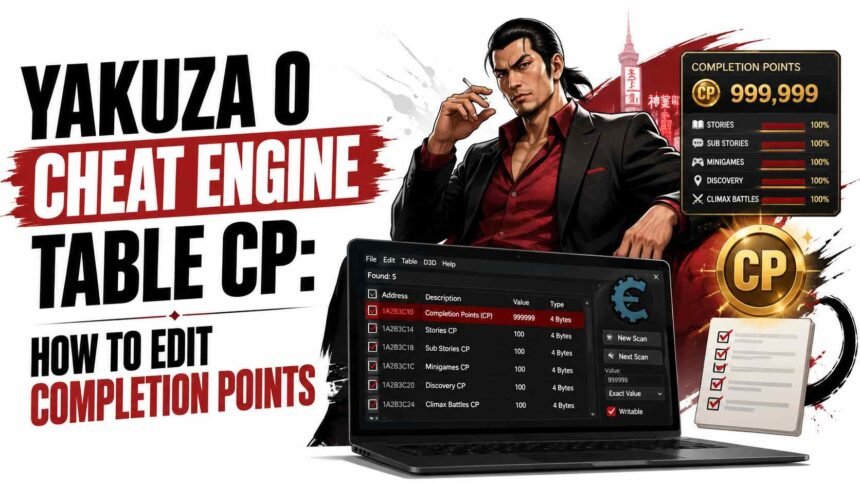
The Yakuza 0 Cheat Engine table for CP lets you edit Completion Points directly without grinding every substory, minigame, and side activity in the game. If you want to reach 100 percent completion or unlock CP rewards without replaying content, this guide covers how to load a Yakuza 0 Cheat Engine table, edit your CP value safely, and avoid the two problems that cause most players to lose progress.
What Completion Points Are and Why Players Edit Them
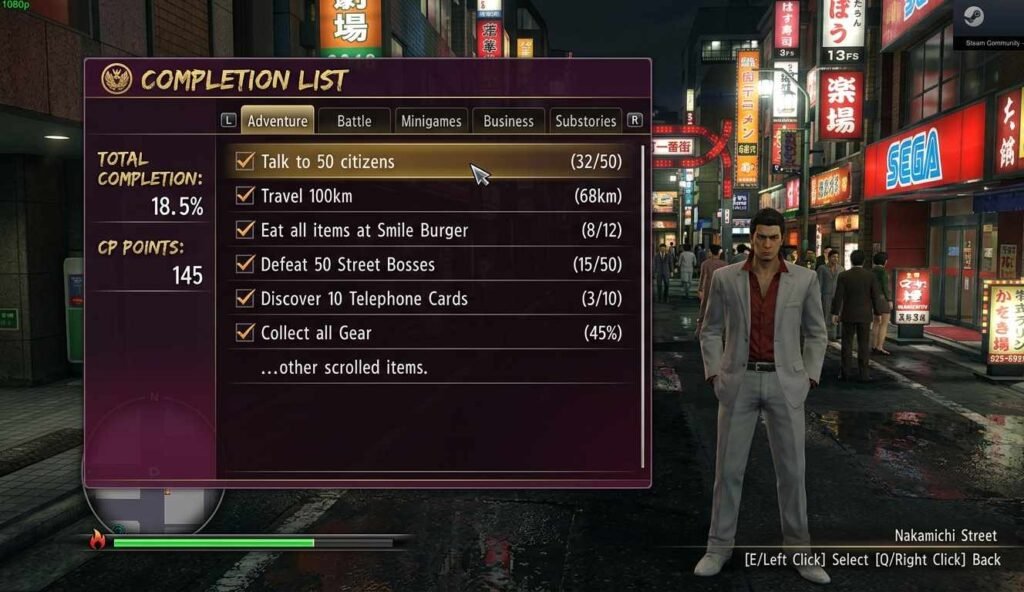
Completion Points, usually abbreviated as CP, are a meta-progression currency in Yakuza 0. You earn them by completing substories, clearing minigames, finishing friendship events, and hitting milestones across the game. CP is then spent at CP shops to unlock useful upgrades, story items, and rewards that are otherwise unavailable through normal gameplay.
The problem most players run into is that earning CP organically requires completing an enormous amount of optional content. Some of it’s genuinely enjoyable. Some of it, particularly the business management minigames played to completion and every variant of the batting cage, is tedious enough that players would rather edit the value and move on.
Using a Yakuza 0 Cheat Engine table to edit CP does not affect story progress, character stats earned through gameplay, or anything else in the save file beyond the CP value itself. It is one of the most targeted and low-risk memory edits you can make in the game.
What You Need Before You Start the Yakuza 0 Cheat Engine Table
Before loading any Yakuza 0 Cheat Engine table, make sure you have the right tools from the right sources. The safety of this procedure depends almost entirely on where you download from.
- Cheat Engine from the official site only. Download from cheatengine.org and nowhere else. Third-party downloads of Cheat Engine frequently bundle malware. The official site is free, and the download is clean.
- A Yakuza 0 Cheat Engine table file. These are .CT files shared by the community on sites like GitHub repositories or the Fearless Revolution cheat table forum. Look for tables with recent update dates and positive comments confirming they work with the current Steam build.
- Yakuza 0 on PC via Steam. The Cheat Engine table method only works on the PC version. Console versions have no equivalent memory editing option.
- A backup of your save file. Locate your Yakuza 0 save folder before starting. On Steam, it is typically found at: C:\Users\[YourName]\AppData\Roaming\Sega\Yakuza0. Copy the entire folder to a safe location before editing anything.
For a verified, up-to-date Yakuza 0 Cheat Engine table for CP and other values, the Fearless Revolution cheat tables forum is the most trusted community source with user-confirmed compatibility notes.
How to Load a Yakuza 0 Cheat Engine Table
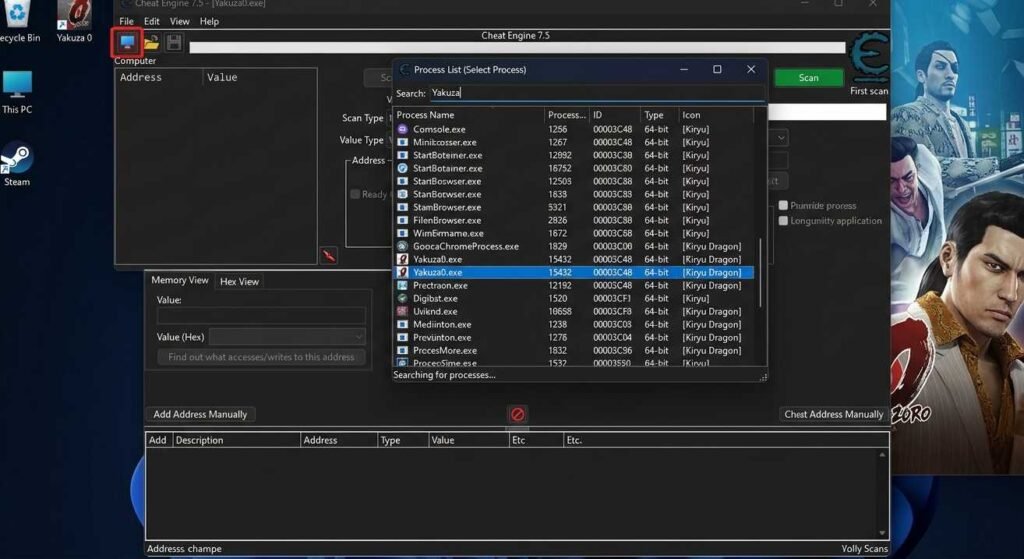
Loading a Yakuza 0 Cheat Engine table is a three-step process: open Cheat Engine, attach it to the game process, then load the table file.
| Step | Action | What to Expect |
| 1 | Launch Yakuza 0 and get to the main menu or into gameplay | The game must be running before Cheat Engine can attach to it |
| 2 | Open Cheat Engine — run as administrator if it fails to see the process | The Cheat Engine main window opens with a process list button at the top left |
| 3 | Click the process list button (computer icon) and find Yakuza0.exe in the list | Select it and click Open — Cheat Engine is now attached to the game |
| 4 | Go to File > Load in Cheat Engine and browse to your downloaded .CT table file | The table entries load into the Cheat Engine address list |
| 5 | Tick the checkbox next to the CP entry in the table to activate it | The address becomes active and ready to edit |
If Yakuza 0 does not appear in the Cheat Engine process list, try running Cheat Engine as an administrator. Some Steam versions of Yakuza 0 run with elevated privileges that Cheat Engine cannot attach to without matching permissions.
How to Edit Yakuza 0 Cheat Engine Table CP Values Safely
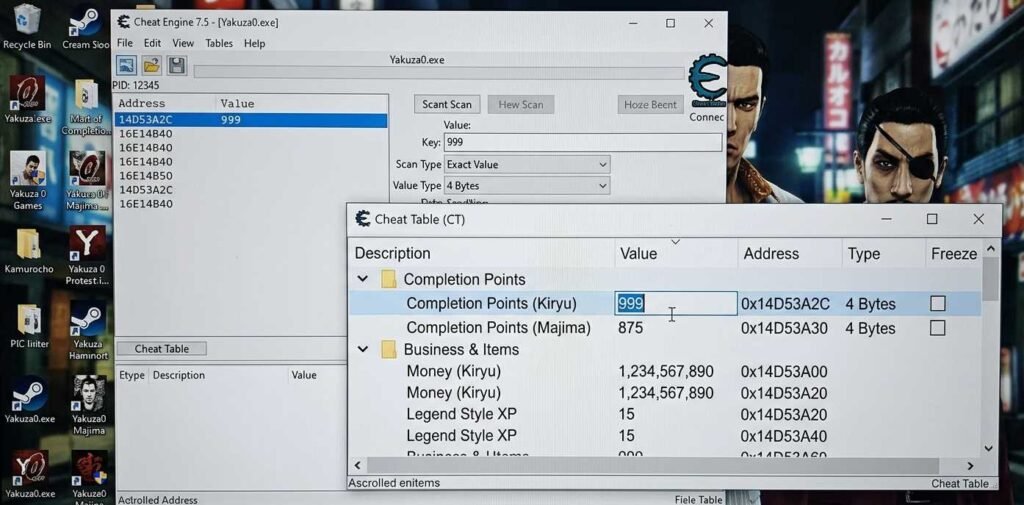
With the Yakuza 0 Cheat Engine table loaded and the CP entry activated, editing the value is simple. The key is using a reasonable number rather than an extreme value. This is the experience tip that most guides skip and the one that prevents the most common problem.
- Double-click the value field next to the CP address entry in Cheat Engine.
- Enter your desired CP amount. Do not enter an absurdly large number like 99999999. Amounts significantly beyond the game’s normal maximum (which is in the tens of thousands range) can cause the CP menu to display incorrectly, freeze on load, or break the shop interface.
- A safe target is 50,000 to 99,999 CP. This is enough to buy everything in both character CP shops without triggering any overflow or display issues.
- Press Enter or click OK to approve the new value.
- Switch back to Yakuza 0 and open the CP shop or completion list to verify that the new value appears correctly.
- If the value reverts, the table entry may need to be frozen. Right-click the entry in Cheat Engine and select Freeze or tick the Active box to lock the value in place.
The most important rule for the Yakuza 0 Cheat Engine table CP edit: add CP in increments if you are unsure about your game’s maximum. Add 10,000, check the menu, add another 10,000. This is slower, but it prevents the value from going beyond what the game handles cleanly.
How to Avoid Yakuza 0 Cheat Engine Table Save Corruption and Crashes
Most Cheat Engine-related problems in Yakuza 0 come from a small number of avoidable mistakes. Keeping to these habits keeps you safe and the game stable.
- Back up your save before every editing session. This is the single most important habit. If anything goes wrong, you restore from backup. Without a backup, you have no recovery option.
- Edit CP with the game paused or on the main menu. Editing values while cutscenes or major game systems are actively loading increases crash risk significantly.
- Do not enter CP values above 99,999. Yakuza 0 CP menus are not designed to display or handle values beyond the game’s intended maximum cleanly.
- Use the Yakuza 0 Cheat Engine table offline. Disconnect from Steam’s online features before editing. While Yakuza 0 has no competitive online mode, offline play removes any remote session tracking that could flag unusual memory activity.
- Close Cheat Engine before triggering autosaves. The safest approach is to make your edit, verify it in-game, close Cheat Engine completely, then manually save. This ensures the save file written does not have Cheat Engine actively attached when the write happens.
- Verify the table version matches your game build. Yakuza 0 has received patches since launch. A table written for an older build may point to the wrong memory addresses. Check the table’s release date against your Steam game version.
For our full PC cheat and mod guide collection, visit our PC cheats and mods hub. For other Cheat Engine guides for PC games, see our
Frequently Asked Questions
Does the Yakuza 0 Cheat Engine table CP edit work on the Game Pass version?
The Yakuza 0 Cheat Engine table method is designed for the Steam version. The Xbox Game Pass PC version of Yakuza 0 uses a different executable and different memory structure, so table files built for the Steam version will not attach correctly. Some players have had success with manual Cheat Engine scanning on the Game Pass version, but no widely shared table exists for it as of 2026.
Can editing CP in the Yakuza 0 Cheat Engine table get me banned?
No. Yakuza 0 is a single-player game with no competitive online component. There is no anti-cheat system to detect memory editing and no ban mechanism tied to your Steam account for single-player game modifications. The only risk is to your own save file, which is why backing up before editing is so important.
My Yakuza 0 CP value keeps reverting after I edit it. What is wrong?
The game is overwriting the memory value faster than your edit persists. The fix is to freeze the value in Cheat Engine. Right-click the CP entry in your loaded table and select the freeze or lock option, or tick the Active checkbox if one appears next to the entry. This tells Cheat Engine to continuously write your value back to that address, preventing the game from resetting it.
The Yakuza 0 Cheat Engine table for CP is one of the cleanest and safest memory edits you can make in any game. It touches one value, affects nothing else, and gives you access to content that would otherwise require dozens of hours of optional grind. Back up first, keep the value sane, and the whole process takes about five minutes.